






Amazon Business in Aggie Enterprise is a punchout catalog offering a variety of items.
NOTE: Amazon catalog orders use the shipping address entered in Aggie Enterprise, and not the address listed in the Amazon punchout (any addresses entered in the Amazon punchout are ignored).
- Resource: Amazon Registration in Aggie Enterprise (PDF)
- How Does It Work?
- Getting Started: Amazon User Profile
- Amazon Purchases in Aggie Enterprise
- Order Status and Past Order History
- FAQ
- Contact Information
How Does It Work?
The Amazon Business catalog has the same look as the customer-facing Amazon catalog, but with thousands of additional items, and university-highlighted preferred categories.
Items that should not be purchased from Amazon are identified as "blocked." In most cases, a blocked item is available from another Aggie Enterprise catalog.
Getting Started: Amazon User Profile
- Log in to Aggie Enterprise. Do not log in directly to the public-facing Amazon website.
- Follow the catalog purchase instructions to access the Amazon catalog. Pop-ups must be enabled in order to use the Amazon punchout site (pop-up enable instructions for Chrome and FireFox)
- When you access the Amazon Business punchout in Aggie Enterprise for the first time, you will be required to set up your customer profile if you haven't used Amazon before. If you already have an Amazon account tied to your business e-mail account and use this account solely for business purposes, you can migrate that account to the punchout in Aggie Enterprise by selecting "I want to convert my existing account and transfer my order history and info to my business user account."
Amazon Business Purchases Should Be Made in Aggie Enterprise
Aggie Enterprise should be used for all of your Amazon-related business purchases. Amazon purchases should NOT be processed on a Procurement Card.
Order Status and Past Order History
To see details on your current and past Amazon orders:
- Click on your name in the upper right corner of the Amazon home page, and then click on the Your Orders tile.

2. On the Your Orders screen, click on the View order reports button.

3. On the Business analytics screen, select the desired date range in the Order Date drop-down, and then click on the Generate report button:

FAQ
- Do all Aggie Enterprise users need to register on the Amazon punchout site?
- No, only users who are going to shop the Amazon site need to register for a user account with Amazon. If you aren't planning to use Amazon, or if you are an approver who doesn't do any shopping, you aren't required to set up an Amazon account.
- Is shopping in Amazon in Aggie Enterprise restricted to Fulfilled by Amazon items?
- Both Fulfilled by Amazon items and third-party seller items are available.
- Is the website address for a product the same in Amazon Business as it is in the consumer site?
- No, the website addresses are different. This means that links to the consumer site are not directly usable in the punchout. You can search for the product in both sites by the ASIN (Amazon Standard Identification Number) in the product description field.
- Does checking out work the same way in Amazon in Aggie Enterprise?
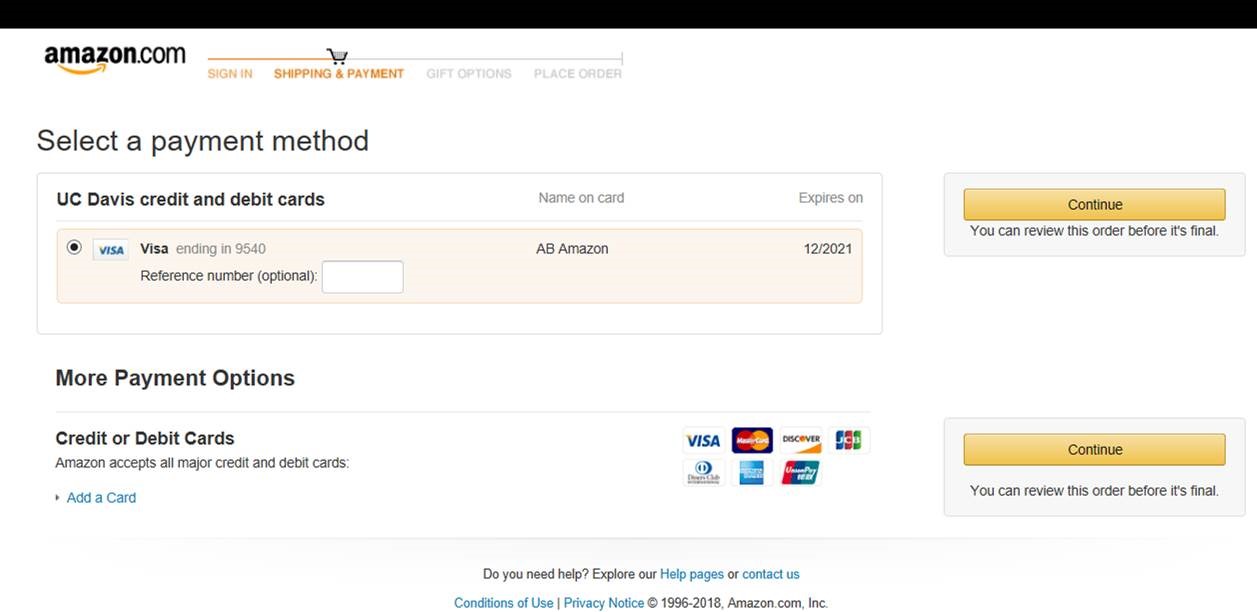
- Like other Aggie Enterprise punchout sites, you do not enter payment information in the Amazon punchout screen. When you get to the Amazon Shipping & Payment screen, please ignore the Reference number and Payment options (as shown in the screenshot below), and hit Continue. A shipping address is entered in Aggie Enterprise, and not in the Amazon punchout (addresses entered in the Amazon punchout will be ignored).
- Does Amazon in Aggie Enterprise include Prime shipping?
- Yes! Business Prime is included with our Amazon contract. Keep in mind that many, but not all, items have an option for Prime or free shipping. However, items in the Amazon catalog being sold from third-party sellers generally do not include free shipping. It is important to confirm the shipping costs if purchasing from a third-party seller; in some cases, the cost of the shipping may exceed the cost of the item. There are most likely less expensive options available with an Amazon-fulfilled order, or with the use of another catalog in Aggie Enterprise.
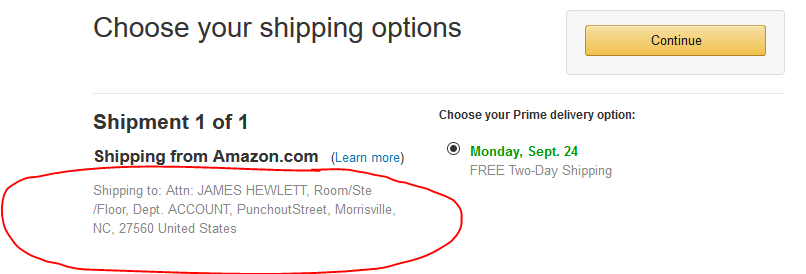
- I don't recognize the default shipping address listed in the Amazon punchout in Aggie Enterprise. Do I need to change it?
- No. The address listed in the Amazon punchout is NOT used for delivery purposes. The address section in Aggie Enterprise which is available in the Shipping section when checking out a cart is to be used to make any updates to your shipping address.
- How are shipments from Amazon in Aggie Enterprise delivered?
- Amazon shipments to the Davis campus are part of the Last Mile Initiative, that helps to centralize and expedite shipments arriving on campus, while reducing the carbon footprint of the vehicles needed to make the deliveries.
- What about Weekend or Holiday delivery?
- Our university agreement with Amazon specifies University operating hours and Holidays. The agreement stipulates that deliveries should not be attempted outside of established operating hours. When placing orders in the Amazon catalog, leave the default delivery settings as they are, and do not select RUSH or same-day shipping, as that will bypass the built-in delivery restrictions.
- Can shipments be directed to the Amazon lockers on campus?
- At this time, Amazon Business cannot direct shipments to the campus Amazon lockers. The Amazon@UC Davis location in the UC Davis Bookstore can be used to return Aggie Enterprise Amazon orders, however.
- What happens if the price changes after we’ve added the item to our cart?
- Once an Amazon order has been brought back into an Aggie Enterprise cart there is a 7 (calendar) day price lock.
- Does Amazon in Aggie Enterprise require additional approvals for orders?
- Amazon in Aggie Enterprise orders route for fiscal approval just like every other Aggie Enterprise order. There are no additional required approvals.
Contact Information
- Please do not contact the UCD Procurement team for questions on Amazon orders or items.
- For Order Help: Please use the Contact Us link at the bottom of the Amazon punchout page to contact Amazon Business Customer Service. You can then email, chat, or request that they call you.
- NOTE: We discourage users from calling the 1-888 number, as this will require you to verify that you are part of the UC Davis Amazon in Aggie Enterprise group, and will be an unnecessary hassle compared to using the punchout link.